
今回は、 TensorFlow.js の Depth Estimation を使って深度推定を試していきます。コードは前回からの使い回しです。

完成しているコードは下記にあります。
Angular-sample/tensorflow at main · tsuneken5/Angular-sample
Contribute to tsuneken5/Angular-sample development by creating an account on GitHub.
github.com
深度推定とは
環境
- node: 18.20.0
- Angular CLI:17.0.0
- TensorFlow.js:4.22.0
- TensorFlow-model / Depth Estimation:2.1.3
GitHub - tensorflow/tfjs: A WebGL accelerated JavaScript library for training and deploying ML models.
A WebGL accelerated JavaScript library for training and deploying ML models. - tensorflow/tfjs
github.com
tfjs-models/depth-estimation at master · tensorflow/tfjs-models
Pretrained models for TensorFlow.js. Contribute to tensorflow/tfjs-models development by creating an account on GitHub.
github.com
パッケージのインストール
$ npm install @tensorflow/tfjs
$ npm install @tensorflow-models/depth-estimation
サービスの作成
$ ng generate service service/canvas public async uploadImage(imgStr: string, maxWidth: number, canvas: HTMLCanvasElement): Promise<void> {
const img = new Image();
const ctx = canvas.getContext('2d') as CanvasRenderingContext2D;
let scaleRaito: number = 1;
img.src = imgStr;
return new Promise((resolve, reject) => {
img.onload = () => {
let imageWidth = img.naturalWidth
if (imageWidth > maxWidth) {
imageWidth = maxWidth;
scaleRaito = imageWidth / img.naturalWidth;
}
canvas.width = imageWidth;
let imageHeight = img.naturalHeight * scaleRaito;
canvas.height = imageHeight;
resolve(ctx.drawImage(img, 0, 0, imageWidth, imageHeight));
};
img.onerror = (error) => {
console.log(error);
reject;
}
});
}
public drawImage(image: ImageData, canvas: HTMLCanvasElement): void {
canvas.width = image.width;
canvas.height = image.height;
const ctx = canvas.getContext('2d') as CanvasRenderingContext2D;
ctx.putImageData(image, 0, 0);
}uploadImage
base64形式の画像を canvas に描画するためのメソッドです。
drawImage
ImageData形式の画像を canvas に描画するためのメソッドです。
コンポーネントの作成
$ ng generate component component/page/depth-estimationimport { Component } from '@angular/core';
import * as tf from '@tensorflow/tfjs';
import * as depthEstimation from '@tensorflow-models/depth-estimation';
import { ImageUploaderComponent } from '../../share/image-uploader/image-uploader.component';
import { LoadingSpinnerComponent } from '../../share/loading-spinner/loading-spinner.component';
import { LoadingSpinnerService } from '../../../service/loading-spinner.service';
import { CanvasService } from '../../../service/canvas.service';
@Component({
selector: 'app-depth-estimation',
standalone: true,
imports: [ImageUploaderComponent, LoadingSpinnerComponent],
templateUrl: './depth-estimation.component.html',
styleUrl: './depth-estimation.component.css'
})
export class DepthEstimationComponent {
private canvas!: HTMLCanvasElement;
private estimator!: depthEstimation.DepthEstimator;
private readonly ESTIMATION_CONFIG = {
minDepth: 0,
maxDepth: 1,
};
private readonly COLOR_MAP = [
[255, 0, 0], // 赤 (近い)
[255, 255, 0], // 黄色
[0, 255, 0], // 緑
[0, 255, 255], // シアン
[0, 0, 255], // 青
[0, 0, 128], // 濃紺
[0, 0, 0] // 黒 (遠い)
];
private colorMap: number[][]
constructor(
private loadingSpinnerService: LoadingSpinnerService,
private canvasService: CanvasService
) {
this.colorMap = this.generateGradient(this.COLOR_MAP, 256);
}
private generateGradient(colorStops: number[][], steps: number): number[][] {
const result: number[][] = [];
const segments = colorStops.length - 1;
const stepsPerSegment = Math.floor(steps / segments);
for (let i = 0; i < segments; i++) {
const startColor = colorStops[i];
const endColor = colorStops[i + 1];
const segmentSteps = i === segments - 1 ? steps - (stepsPerSegment * (segments - 1)) : stepsPerSegment;
for (let j = 0; j < segmentSteps; j++) {
const ratio = j / segmentSteps;
const color = [
Math.round(startColor[0] + (endColor[0] - startColor[0]) * ratio),
Math.round(startColor[1] + (endColor[1] - startColor[1]) * ratio),
Math.round(startColor[2] + (endColor[2] - startColor[2]) * ratio)
];
result.push(color);
}
}
// 最後の色を追加
result.push(colorStops[colorStops.length - 1]);
return result;
}
private async loadModel(): Promise<void> {
this.loadingSpinnerService.show();
await tf.ready();
const model = depthEstimation.SupportedModels.ARPortraitDepth;
this.estimator = await depthEstimation.createEstimator(model);
this.loadingSpinnerService.hide();
}
private async detect(canvas: HTMLCanvasElement): Promise<depthEstimation.DepthMap> {
const predictions = await this.estimator.estimateDepth(canvas, this.ESTIMATION_CONFIG);
return predictions;
}
public async startDetected(image: string): Promise<void> {
this.loadingSpinnerService.show();
const parent = this.canvas.parentElement as HTMLElement;
const width = parent.clientWidth;
const canvas = document.createElement('canvas') as HTMLCanvasElement;
await this.canvasService.uploadImage(image, width, canvas);
const result = await this.detect(canvas);
const colorizedDepth = this.colorizeDepth(await result.toArray());
const imageData = new ImageData(colorizedDepth, canvas.width, canvas.height);
this.canvasService.drawImage(imageData, this.canvas);
this.loadingSpinnerService.hide();
}
private colorizeDepth(depthMap: number[][]): Uint8ClampedArray {
const height = depthMap.length;
const width = depthMap[0].length;
const colorized = new Uint8ClampedArray(width * height * 4);
for (let y = 0; y < height; y++) {
for (let x = 0; x < width; x++) {
const depth = depthMap[y][x];
const colorIndex = Math.floor((1 - depth) * (this.colorMap.length - 1));
const idx = (y * width + x) * 4;
const [r, g, b] = this.colorMap[colorIndex];
colorized[idx] = r;
colorized[idx + 1] = g;
colorized[idx + 2] = b;
colorized[idx + 3] = 255;
}
}
return colorized;
}
async ngOnInit() {
this.loadModel();
}
ngAfterViewInit() {
this.canvas = document.getElementById('myCanvas') as HTMLCanvasElement;
}
}
generateGradient
グラデーションのカラーマップを作成するメソッドです。
loadModel
モデルをロードします。
detect
canvas に描画した画像を渡して深度推定を行います。結果は0~1の数値が入った配列で返ってきます。近い場所は0、遠く場所は1で返ってくるようになっています。
colorizeDepth
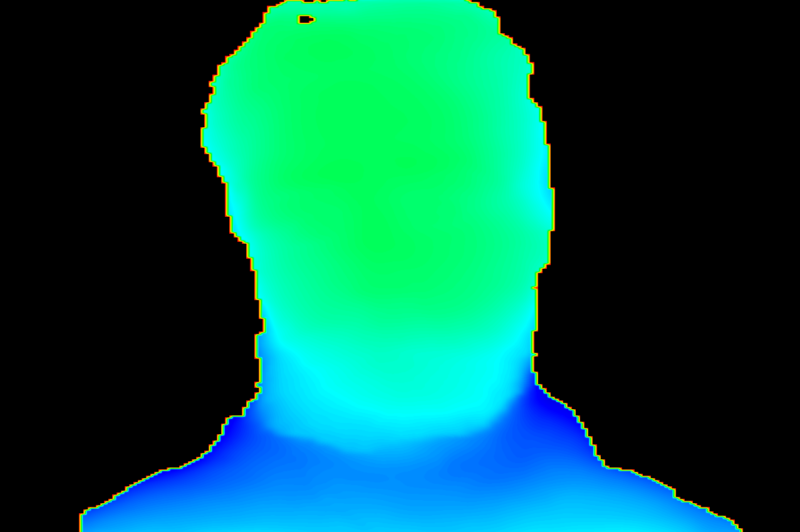
結果の表示には toCanvasImageSource() というメソッドも準備されているのですが、これだと白黒表示で推定結果がわかりにくいため、このメソッドを使って深度推定の結果をグラデーションで表示できるようにします。気をつけないといけないのは、判定結果が0に近いほど距離も近くになるのですが、判定外の領域も0で返ってきます。今回は判定結果が0の領域は判定外というロジックにしています。
実行結果
元画像
https://pixabay.com/photos/beard-face-man-model-mustache-1845166/

実行結果


コメント